

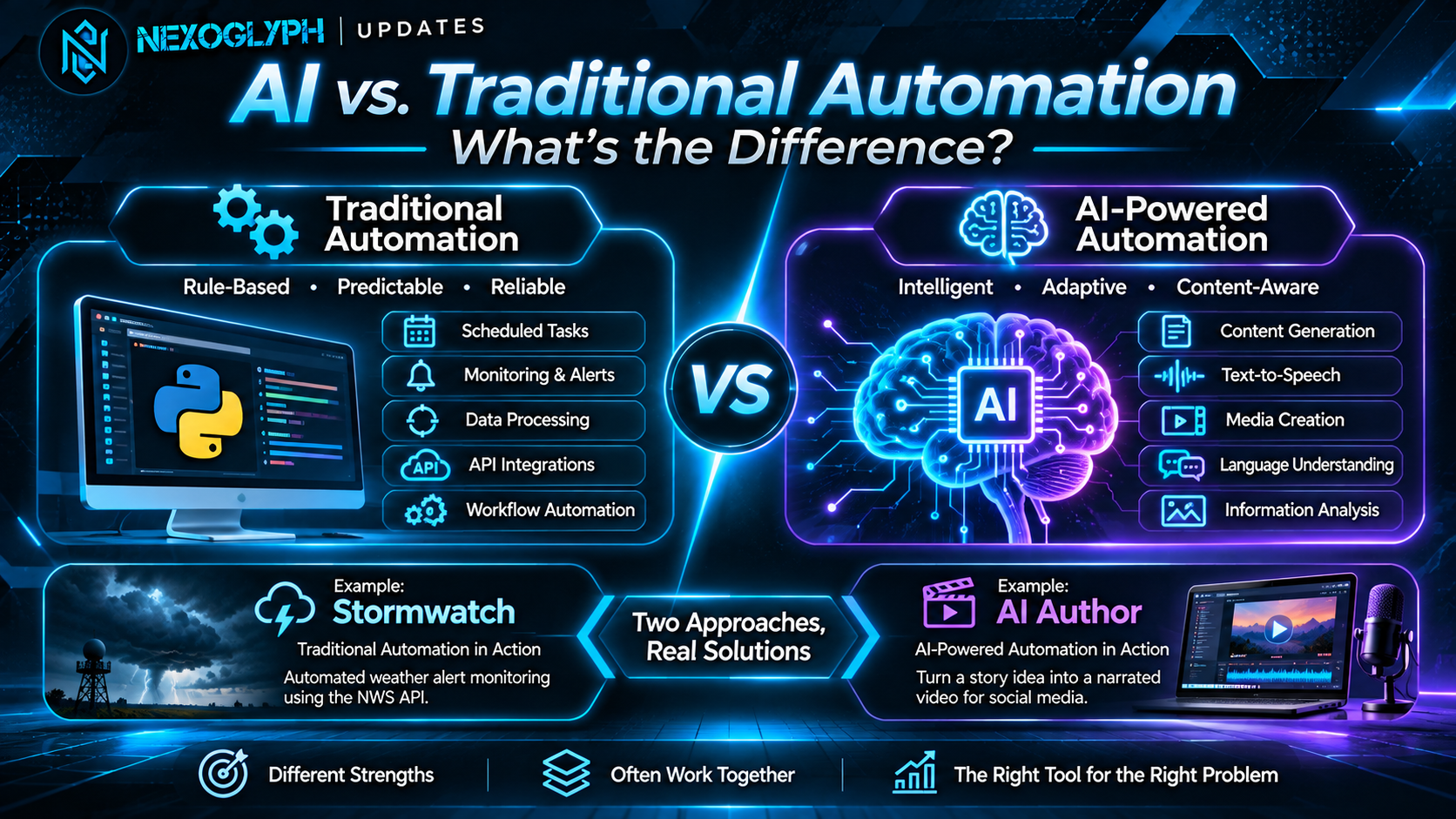
Artificial intelligence is changing the way businesses approach technology. From AI-powered content creation to intelligent customer support systems, organizations are discovering new ways to streamline operations and accomplish tasks that once required significant human involvement.
However, not every automated process needs artificial intelligence.
In fact, many of the most effective automation solutions rely on traditional programming techniques that have existed for decades.
Whether it’s monitoring incoming information, generating reports, sending notifications, or processing customer requests, automation can take many forms.
The important question isn’t whether your business should use AI. It’s whether AI is the right technology for the problem you’re trying to solve.
Understanding the differences between traditional automation and AI-powered automation can help businesses make better technology decisions, avoid unnecessary expenses, and develop solutions that provide meaningful value.
What Is Traditional Automation?
Traditional automation uses predefined instructions, rules, and conditions to perform tasks without requiring constant human involvement.
These systems operate according to logic established by developers or administrators.
For example, consider a business that wants to receive a notification whenever its website becomes unavailable.
A traditional monitoring application could:
- Check the website at scheduled intervals.
- Determine whether the website responds successfully.
- Record the result.
- Send a notification when a problem is detected.
- Continue monitoring until the issue is resolved.
The application doesn’t need to understand the website’s content or make complex decisions about what the business should do.
It simply follows a defined process.
Traditional automation is particularly effective when tasks are repetitive, conditions are predictable, and the desired outcome can be expressed through clear rules.
Common Examples of Traditional Automation
Businesses use traditional automation in many ways, including:
- Scheduled Backups: Automatically creating copies of important files or databases.
- Website Monitoring: Checking whether websites and services are accessible.
- Email Notifications: Sending messages when specific conditions occur.
- Data Synchronization: Transferring information between compatible applications.
- Automated Reporting: Collecting data and generating reports on a schedule.
- Inventory Alerts: Notifying employees when stock levels fall below a defined threshold.
- File Processing: Renaming, organizing, converting, or transferring files automatically.
These solutions can save time, reduce repetitive work, and improve consistency without relying on artificial intelligence.
What Is AI-Powered Automation?
AI-powered automation incorporates artificial intelligence models into an automated workflow.
Unlike purely rule-based systems, AI applications can perform certain tasks involving language, images, audio, pattern recognition, or other information that would be difficult to address with simple predefined rules.
For example, imagine a business that regularly produces educational content for social media.
A traditional application could schedule posts, resize videos, or upload completed media files.
An AI-powered application could go further by generating written content from a topic, producing synthesized narration, or analyzing text to help organize information.
The difference is that AI can contribute to tasks involving interpretation or content generation rather than simply executing a fixed sequence of instructions.
However, AI systems are not automatically more accurate or reliable.
Generative AI can produce incorrect information, misunderstand instructions, or generate inconsistent results. These limitations make testing, validation, and human oversight important when using AI in business applications.
AI vs. Traditional Automation: A Side-by-Side Comparison
Although both approaches can automate tasks, they differ in how they process information and produce results.
| Feature | Traditional Automation | AI-Powered Automation |
|---|---|---|
| Primary Approach | Predefined rules and instructions | AI models combined with application logic |
| Best Suited For | Repetitive, predictable processes | Tasks involving language, content, or complex patterns |
| Decision-Making | Based on programmed conditions | Based on model outputs and defined constraints |
| Output Consistency | Generally predictable for the same inputs | May vary, depending on the model and configuration |
| Development Complexity | Often lower for straightforward workflows | May require additional integration, testing, and validation |
| Operating Costs | Primarily infrastructure and maintenance | May include model usage and processing costs |
| Common Examples | Notifications, backups, monitoring | Content generation, transcription, document classification |
| Human Oversight | Depends on the process | Especially important for consequential or accuracy-sensitive outputs |
Neither approach is inherently superior.
Traditional automation often provides a simpler and more predictable solution. AI becomes valuable when the task involves capabilities that conventional rule-based programming cannot easily reproduce.
Real-World Example: Stormwatch and Traditional Automation
One way to understand traditional automation is to examine how monitoring applications work.
At NexoGlyph, one of our Python development projects is Stormwatch, an application designed around automated weather alert monitoring.
The concept addresses a straightforward problem: important weather information can change throughout the day, and manually checking for updates requires continuous attention.
Rather than requiring users to repeatedly visit a weather website, an application can retrieve information from an external data source, evaluate relevant alerts, and notify the user when specified conditions are detected.
Stormwatch uses the National Weather Service (NWS) API as a source of weather alert information.
Its underlying automation follows a structured process:
- Retrieve Information: Request weather alert data through the NWS API.
- Process the Response: Interpret the structured data returned by the service.
- Evaluate Conditions: Determine which alerts match the application’s monitoring criteria.
- Track Information: Keep records of previously processed alerts to help avoid unnecessary duplicate notifications.
- Notify the User: Generate notifications when relevant alert conditions are identified.
This process can operate through traditional Python programming without relying on a generative AI model.
The application doesn’t need to create new weather forecasts or independently interpret atmospheric conditions.
Instead, it processes information from an established source and performs actions based on predefined rules.
What Can Businesses Learn From Stormwatch?
The same general architecture can be applied to many other monitoring scenarios.
For example, a custom application could monitor:
- Website and server availability
- Changes in product inventory
- Updates from external APIs
- Scheduled business events
- Changes in publicly available datasets
- System performance indicators
- Important operational conditions
The underlying principle remains the same: retrieve data, evaluate conditions, and automatically respond when defined criteria are met.
Stormwatch illustrates how relatively straightforward automation can provide useful functionality without introducing unnecessary AI complexity.
Real-World Example: AI Author and AI-Powered Automation
Now consider a different type of problem.
What if a user wants to transform a simple story idea into narrated video content suitable for social media?
Unlike monitoring a structured data source, creating an original story requires generating language based on the user’s creative direction.
This is where artificial intelligence becomes particularly useful.
Another NexoGlyph Python development project, AI Author, explores this type of content-generation workflow.
AI Author is designed to transform user-provided input into a written story, generate AI-based text-to-speech narration, and combine that narration with background video.
The workflow consists of several stages:
Step 1: User Input
The user provides the initial creative direction for a story.
This might include a concept, theme, scenario, or description of the desired content.
Step 2: AI Story Generation
A generative AI model processes the user’s instructions and produces a written narrative.
This stage involves language generation, making it fundamentally different from a conventional rule-based automation task.
Step 3: Text-to-Speech Generation
The application converts the written story into spoken narration using AI text-to-speech technology.
The resulting audio provides the voice component of the finished content.
Step 4: Video Processing
The application combines the generated narration with background video footage.
This portion of the workflow involves media processing and automation rather than necessarily requiring generative AI.
Step 5: Content Output
The completed result is a narrated video that can be used as social media content.
This workflow demonstrates something important:
AI-powered applications frequently combine artificial intelligence with traditional automation.
AI Author uses AI for tasks such as story generation and speech synthesis, while conventional programming coordinates the workflow and combines the media components.
The result is a system in which different technologies work together to accomplish a larger objective.
Why AI and Traditional Automation Often Work Better Together
It’s easy to imagine AI and traditional automation as competing technologies.
In practice, they’re often complementary.
Many sophisticated applications combine deterministic programming with AI-powered processing.
For example, consider an automated customer inquiry system.
Traditional automation could receive a website form submission, validate the provided contact information, and store the request.
An AI model could then classify the inquiry by topic or generate a suggested response.
Finally, traditional automation could route the request to the appropriate employee or place the suggested response into a review queue.
Each technology performs the part of the workflow where it provides the most value.
The same principle applies to AI Author.
Generative AI creates the narrative, text-to-speech technology produces narration, and automated media processing assembles the content.
Developers don’t need to use AI for every step simply because the application incorporates artificial intelligence.
In many cases, keeping predictable tasks within traditional programming makes the application easier to test, maintain, and control.
When Should Your Business Use Traditional Automation?
Traditional automation is usually the better starting point when a process follows clear, repeatable rules.
For example, consider the following requirements:
“Notify me when a website goes offline.”
A monitoring application can determine whether the website responds successfully and send an alert when necessary.
“Generate a sales report every Friday.”
A script can retrieve structured sales data, calculate totals, and create a report.
“Send a confirmation email whenever a customer submits a form.”
A website integration can recognize the submission and trigger an email.
These tasks generally don’t require artificial intelligence.
Adding AI could increase development complexity and operating costs without providing meaningful improvements.
Traditional automation is often the most practical option when accuracy, predictability, and consistent execution are priorities.
When Does AI Become the Better Choice?
AI becomes useful when the task involves interpreting or generating information that doesn’t fit neatly into predefined rules.
Potential applications include:
Content Generation
Creating first drafts of written articles, marketing copy, product descriptions, or fictional narratives.
Document Processing
Extracting or classifying information from documents with varying formats and structures.
Speech and Audio Processing
Generating narration, transcribing recordings, or processing spoken language.
Customer Support Assistance
Categorizing requests, retrieving relevant information, or drafting responses for employee review.
Data Analysis Assistance
Helping users explore datasets, identify possible patterns, or generate natural-language explanations of results.
Media Production
Supporting workflows that combine AI-generated content with automated audio, image, or video processing.
AI can provide substantial value in these scenarios, but its results should be evaluated according to the accuracy, reliability, and consistency required by the application.
For tasks involving sensitive information, financial decisions, or other high-impact outcomes, additional safeguards and human review may be necessary.
What Does It Cost to Implement AI or Automation?
The cost of developing an automation solution depends heavily on what the application needs to accomplish.
A relatively simple Python script that retrieves information from an API and sends notifications may require fewer resources than a full application with user accounts, multiple integrations, complex workflows, and a graphical interface.
AI-powered applications may introduce additional expenses, including:
- AI API usage fees
- Text-to-speech processing costs
- Cloud infrastructure or computing resources
- Data storage and media processing
- Application maintenance
- Testing and quality assurance
- Monitoring of model performance and output quality
Traditional automation also involves development and maintenance costs, particularly when external services change or workflows become more complex.
For either approach, the important consideration is whether the value of the solution justifies its total cost.
A well-designed application should solve a meaningful problem rather than introduce technology simply because it’s available.
Can Small Businesses Benefit From Custom Automation?
Absolutely—and custom automation doesn’t have to mean developing a massive enterprise software platform.
A small business might benefit from a focused application that performs a single task particularly well.
For example:
- A contractor could automate the organization of incoming service requests.
- An online retailer could receive notifications when inventory reaches a specified level.
- A marketing agency could use AI-assisted tools to prepare content drafts.
- A property management company could automate routine reporting.
- A service provider could synchronize information between its website and scheduling system.
Some of these solutions can be implemented with existing software and integrations.
Others may require custom development when a business has specialized requirements or needs greater control over its workflow.
The objective should always be to identify the problem first and select the simplest technology capable of solving it effectively.
How NexoGlyph Approaches AI & Automation
At NexoGlyph LLC, our approach to technology development extends beyond traditional websites and hosting.
We explore custom applications, Python development, API integrations, workflow automation, and artificial intelligence as tools for addressing practical challenges.
Projects such as Stormwatch and AI Author demonstrate two different approaches to software development.
Stormwatch illustrates how structured data processing, external APIs, and automated notifications can support ongoing monitoring.
AI Author demonstrates how generative AI, speech synthesis, and traditional media processing can work together within an automated content-production workflow.
While these applications serve different purposes, they share a common development philosophy:
Understand the problem, identify the right technologies, and build a solution around the intended outcome.
Not every challenge requires artificial intelligence, and not every business needs a complex software platform.
Sometimes, a straightforward Python script is enough. Other situations may benefit from a custom application that integrates multiple technologies and services.
Our goal is to explore and develop practical technology solutions that simplify processes, connect systems, and expand what businesses can accomplish with software.
Final Thoughts
Artificial intelligence and traditional automation are closely related, but they aren’t interchangeable.
Traditional automation excels at carrying out predictable tasks according to defined instructions.
AI-powered automation extends those capabilities into areas involving language generation, speech processing, document interpretation, and other tasks that are difficult to handle through fixed rules alone.
For many businesses, the most effective solution combines both approaches.
The goal shouldn’t be to automate everything with AI. It should be to use the right technology to solve the right problem.
Whether that means monitoring important information, automating administrative tasks, connecting software platforms, or generating digital content, thoughtful automation can help businesses make better use of their resources.
Explore AI & Automation With NexoGlyph
Have an idea for an application or a repetitive process you’d like to simplify?
NexoGlyph explores custom Python development, workflow automation, API integrations, and AI-powered software solutions designed around specific needs.
Discover how NexoGlyph can help turn your ideas into practical technology.